

Introduction
The Asus Zenbook Pro 14 is a premium laptop designed for professionals who demand power, portability, and a stunning display. Available in multiple configurations, this high-performance machine comes with top-tier specs, including Intel Core i7 or i9 processors, dedicated NVIDIA GeForce RTX graphics, and up to 32GB of LPDDR5 RAM.
One of its most distinguishing features is the availability of an OLED display option, which offers deeper blacks, richer colors, and enhanced contrast compared to the standard IPS LCD version. Regarding pricing, the Asus Zenbook Pro 14 price varies based on the model and specifications. The standard model starts at around $999, making it an excellent choice for students and business professionals.
Meanwhile, the Zenbook Pro 14 OLED, with its superior display and high-end hardware, can range from $1,499 to over $2,000, catering to content creators, designers, and gamers who require top-notch performance. But which model is right for you? In this detailed comparison, we’ll explore the key differences between the Asus Zenbook Pro 14 OLED and the standard version, helping you make an informed decision.
| Display Technology | 14-inch OLED, 2880 x 1800 resolution, 120Hz refresh rate | 14-inch IPS LCD, lower resolution, 60Hz refresh rate |
| Color Accuracy | 100% DCI-P3, HDR support, Pantone validated | Standard sRGB color accuracy, no HDR support |
| Processor Options | Intel Core i7/i9 (13th/14th Gen) | Intel Core i5/i7 (13th Gen) |
| Graphics | NVIDIA GeForce RTX 3050/4060 | Integrated Intel Iris Xe Graphics |
| RAM | Up to 32GB LPDDR5 RAM | Up to 16GB LPDDR4X RAM |
| Storage | Up to 1TB PCIe Gen 4 NVMe SSD | Up to 512GB PCIe Gen 3 NVMe SSD |
| Battery Life | 7-10 hours | 9-12 hours |
| Cooling System | Dual-fan cooling with vapor chamber | Standard single-fan cooling |
| Weight | ~1.6 kg (3.5 lbs) | ~1.4 kg (3.1 lbs) |
| Ports & Connectivity | Thunderbolt 4, HDMI 2.1, USB-C, USB-A, SD card reader | USB 3.2, HDMI 1.4, USB-A, no SD card reader |
| Audio | Harman Kardon-certified speakers | Standard stereo speakers |
| Operating System | Windows 11 Pro/Home | Windows 11 Home |
| Build Quality | Premium aluminum chassis, exclusive finishes | Standard aluminum build |
| Price Range | $1,499 – $2,000+ | $999 – $1,300 |
| Best For | Content creators, designers, video editors, power users | Students, business professionals, casual users |
Optimized Performance and Design of the ASUS Zenbook Pro 14
The ASUS Zenbook Pro 14 strikes a compelling balance between power and portability, making it a strong contender for creators and professionals who demand performance on the go. Its high-resolution 14.5-inch OLED display delivers vibrant colors and sharp detail, ideal for graphic design, video editing, and multimedia consumption. Coupled with high-end Intel processors and dedicated NVIDIA graphics, the laptop can handle intensive tasks like rendering and multitasking with ease. Thoughtful features like ASUS’s DialPad control enhance creative workflows by providing intuitive shortcuts and precision adjustments, while the sleek, lightweight build ensures it remains travel-friendly without sacrificing durability. All these elements together illustrate why the Zenbook Pro 14 is often highlighted as a versatile choice for both creative professionals and everyday users seeking a premium laptop experience.
1. Display: OLED vs. IPS LCD
The display technology is one of the most significant differences between the Asus Zenbook Pro 14 OLED and the standard model. The OLED version features a 14-inch panel with a 2880 x 1800 resolution, offering deeper blacks, more vibrant colors, and higher contrast ratios. It makes it ideal for creative professionals who rely on color accuracy for photo and video editing.
On the other hand, the standard Zenbook Pro 14 typically comes with an IPS LCD panel that may have a lower resolution and lacks the same deep contrast and color vibrancy. While still a good display for general use, it doesn’t provide the same high-end visual experience as OLED.
2. Performance and Hardware Differences
Both models have high-performance processors, but there are variations in CPU, GPU, and RAM configurations. The Zenbook Pro 14 OLED often features Intel Core i7 or i9 processors paired with NVIDIA GeForce RTX graphics, making it a powerhouse for intensive tasks like video editing, 3D rendering, and gaming.
In contrast, the standard Zenbook Pro 14 may have slightly lower configurations, such as an Intel Core i5 or i7, and integrated graphics. This makes it more suitable for everyday tasks like browsing, document editing, and light content creation.
Additionally, the OLED model typically supports higher RAM capacities (up to 32GB LPDDR5 RAM) and faster SSD storage (up to 1TB NVMe SSD). In contrast, the standard model may have lower RAM options and slightly slower storage speeds.
3. Battery Life and Power Efficiency
OLED screens consume more power, especially when displaying bright or white backgrounds. However, Despite its powerful components, Asus has optimized the Zenbook Pro 14 OLED with a 76Wh battery, providing decent battery life. With moderate usage, users can expect 7-10 hours of battery life on a single charge.
The standard Zenbook Pro 14, with its lower-power hardware and LCD screen, may offer longer battery life, ranging from 9 to 12 hours, making it a better choice for users who prioritize mobility and long-lasting usage.
4. Design and Build quality
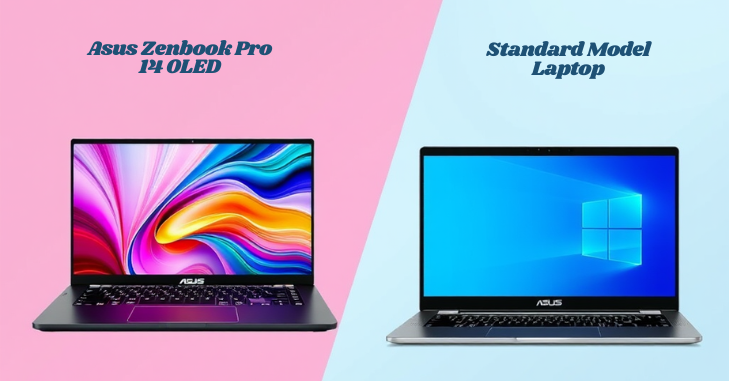
Both models maintain the premium Zenbook design, featuring a lightweight aluminum chassis and ultra-slim bezels. However, the Zenbook Pro 14 OLED often comes in exclusive colors and finishes, making it stand out from the standard model.
Weight is another factor to consider. The OLED model, with its extra components and cooling system, is slightly heavier (around 1.6 kg) compared to the standard model, which may weigh 1.4 kg.
5. Cooling System and Thermal Performance

With higher-performance hardware, the Zenbook Pro 14 OLED requires an advanced cooling system. It features dual-fan cooling with vapor chamber technology, efficiently dissipating heat during heavy workloads. This ensures that the laptop maintains stable performance even under intense usage.
On the other hand, the standard Zenbook Pro 14 has a more straightforward cooling solution. Due to its lower-power components, it doesn’t generate as much heat, making it quieter but less suitable for heavy multitasking and high-performance applications.
6. Connectivity and Ports

Both models offer a variety of ports for connectivity, but the OLED variant often has more advanced options, including:
- Thunderbolt 4 ports enable high-speed data transfer.
- Full-size HDMI 2.1 for external displays
- USB 3.2 Gen 2 Type-A and Type-C ports
- 3.5mm headphone jack
- SD card reader (available in some configurations)
The standard Zenbook Pro 14 may lack some high-end connectivity options, making it less versatile for professionals needing multiple external devices.
7. Audio and Multimedia Experience
The Zenbook Pro 14 OLED has Harman Kardon-certified speakers, which provide richer sound quality and improved bass response. This makes it an excellent choice for media consumption and content creation.
The standard Zenbook Pro 14 also features good-quality speakers, but they may not be as immersive as those in the OLED version.
8. Price and Value for Money
The Zenbook Pro 14 OLED is priced higher due to its premium display, powerful hardware, and advanced cooling system. Depending on the configuration, prices typically start from $1,499 to $2,000 or more.
The standard Zenbook Pro 14 is more affordable, ranging from $999 to $1,300. It is a budget-friendly choice for users who don’t need high-end performance.
9. Which Asus Zenbook Pro 14 Model Should You Choose?
Choosing between the Asus Zenbook Pro 14 OLED and the standard model depends on your specific needs and budget. Suppose you are a content creator, video editor, or professional designer. In that case, the OLED version is the superior choice due to its high-resolution display, more profound contrast, and exceptional color accuracy. The NVIDIA GeForce RTX GPU and high-performance Intel Core i7 or i9 processors also ensure smooth performance for demanding applications like Adobe Premiere Pro, Photoshop, and 3D rendering software.
However, if you need a lightweight, budget-friendly laptop for daily tasks, office work, or casual entertainment, the standard Zenbook Pro 14 offers excellent value. It delivers solid performance with Intel Core i5 or i7 processors, longer battery life, and a more affordable price tag. The IPS LCD still provides good visuals, making it an excellent option for students, business professionals, and general users.
Ultimately, the Zenbook Pro 14 OLED built for professionals who require top-tier performance. At the same time, the standard model is ideal for those who want a premium laptop without the extra cost. Your decision should be based on your workflow, budget, and performance expectations.
Conclusion
The Asus Zenbook Pro 14 is a versatile, powerful laptop that caters to many users. Whether you choose the OLED model for its superior display, high-end specs, and advanced cooling system or the standard model for its affordability, longer battery life, and solid performance, both options deliver exceptional quality.
Thanks to its stunning visuals, powerful GPU, and premium build, the Zenbook Pro 14 OLED is the clear winner for content creators and professionals. However, for students, office workers, and everyday users, the standard Zenbook Pro 14 provides excellent performance without the higher price tag. No matter which model you choose, the Asus Zenbook Pro 14 remains one of the best ultrabooks in the market, combining sleek design, powerful hardware, and cutting-edge features to enhance productivity and creativity.
Apart from this, if you are curious to read an amazing article on then visit our “Gaming” category.
Frequently Asked Questions (FAQs)
The ASUS Zenbook Pro 14 OLED features a 14.5-inch display with a 2880 x 1800 pixels resolution and a 16:10 aspect ratio. It also boasts a 120Hz refresh rate, making it great for creative tasks and smooth visuals.
The ASUS Zenbook 14 Pro OLED is perfect for creative professionals and enthusiasts. Its notable features include a display, Performance, Design, and Battery Life.
The ASUS Zenbook Pro 14 OLED supports multiple external displays. It typically includes one HDMI port, one USB Type-C port with display output, and one DisplayPort. It means you can connect up to three additional external monitors for a multi-display setup, giving you four screens, including the laptop’s display.
The display is one of its strongest features, offering sharp resolution, vibrant colors, and smooth visuals, which are ideal for both professional work and entertainment.
The Zenbook Pro 14 focuses more on high performance, featuring stronger hardware, a higher refresh-rate OLED display, and creator-focused tools like the ASUS DialPad compared to standard Zenbook models.